
I spent the last week building an AI receptionist. Here’s what actually happened.
I’d been reading about AI agents for months. Market growing from $3.85B to $9B. 85% of customer interactions automated by 2025. Big numbers, big promises.
But I wanted to see if I could actually build one myself.
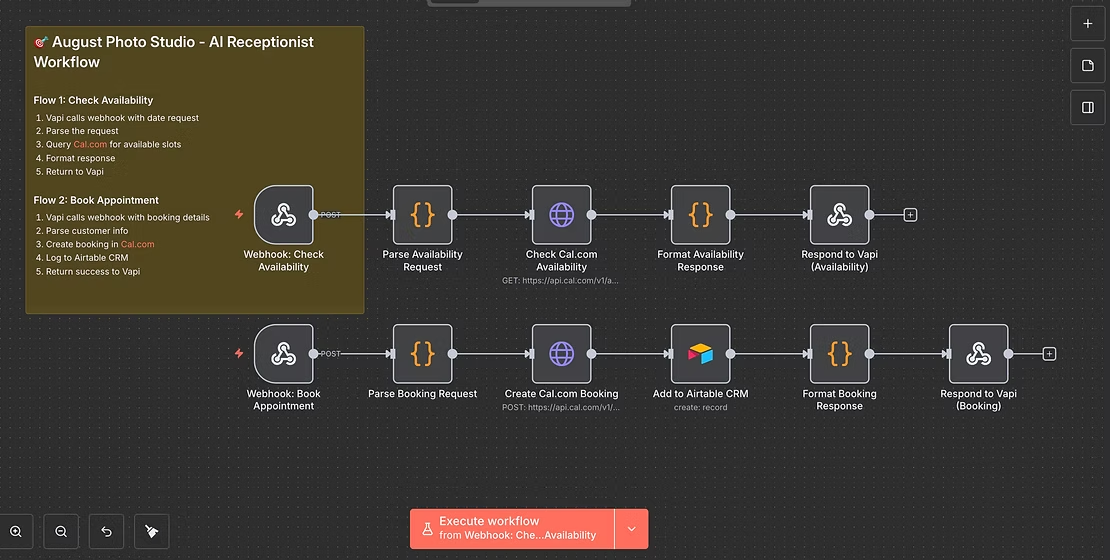
The Project: Create a functional AI receptionist for a fictional photography studio. It needs to answer calls, understand natural conversation, check real-time availability, and book appointments—completely autonomously.
The Tech Stack I Used:
- VAPI – for the voice AI (handles the phone conversations)
- n8n – for workflow automation (this is where everything connects)
- Cal.com – for calendar management
- Airtable – for logging bookings

What I Expected: “This will take a day or two. The tools are all no-code. How hard could it be?”
What Actually Happened:
Hour 3: Spent entirely debugging why the webhook wasn’t receiving data. Turns out VAPI has an “Async” toggle that MUST be on for workflows that take time to process. Nowhere in the docs. Found it by accident.
Hour 8: Finally getting data, but can’t parse it. The AI was putting customer info in conversation messages, not in the function call arguments. Had to restructure the entire VAPI prompt.
Hour 12: Discovered toolCalls (camelCase) and tool_calls (snake_case) are not the same thing. Lost an embarrassing amount of time to this.
Hour 18: Timezone nightmare. Cal.com kept rejecting bookings saying they were “in the past” even though they were clearly in the future. Turns out I was creating dates in server time and not converting to ISO format with timezone offset properly.
Hour 22: Cal.com requires custom field identifiers. My “Session Type” field? The API calls it “Augustine-Osei” (my name). Why? No idea. But now I know to check field identifiers, not labels.
Hour 24: Email validation. Cal.com requires emails even when they’re marked “optional.” Tried generating fake emails, they got rejected. Had to use a real domain.
Then, finally, it worked.
I called the test number. The AI answered. We had a natural conversation. It checked availability. It booked the appointment. The calendar updated. Airtable logged it. Everything just… worked.
That moment was wild.
What I Actually Learned:
1. The AI part is the easy part. VAPI handles natural conversation impressively well. The AI understands context, asks follow-up questions, and sounds natural. That technology just works now.
2. The hard part is making systems talk to each other. 90% of my time wasn’t spent on the AI—it was spent getting webhooks to send data correctly, parsing JSON structures, handling timezone conversions, and reading API docs for Cal.com and Airtable.
3. Documentation doesn’t cover the gotchas. Every tool had quirks not mentioned in docs. VAPI’s async toggle. Cal.com‘s custom field identifiers. n8n’s camelCase vs snake_case handling. You only learn these by building.
4. No-code doesn’t mean no-learning. These tools are accessible, yes. But you still need to understand data structures, API calls, error handling, and debugging. The barrier is lower, but it’s not zero.
5. This technology is genuinely transformative. Once I got past the technical hurdles, I had a working system that could handle unlimited phone calls, 24/7, with no human intervention. For a small business that loses revenue from missed calls, this is game-changing.