
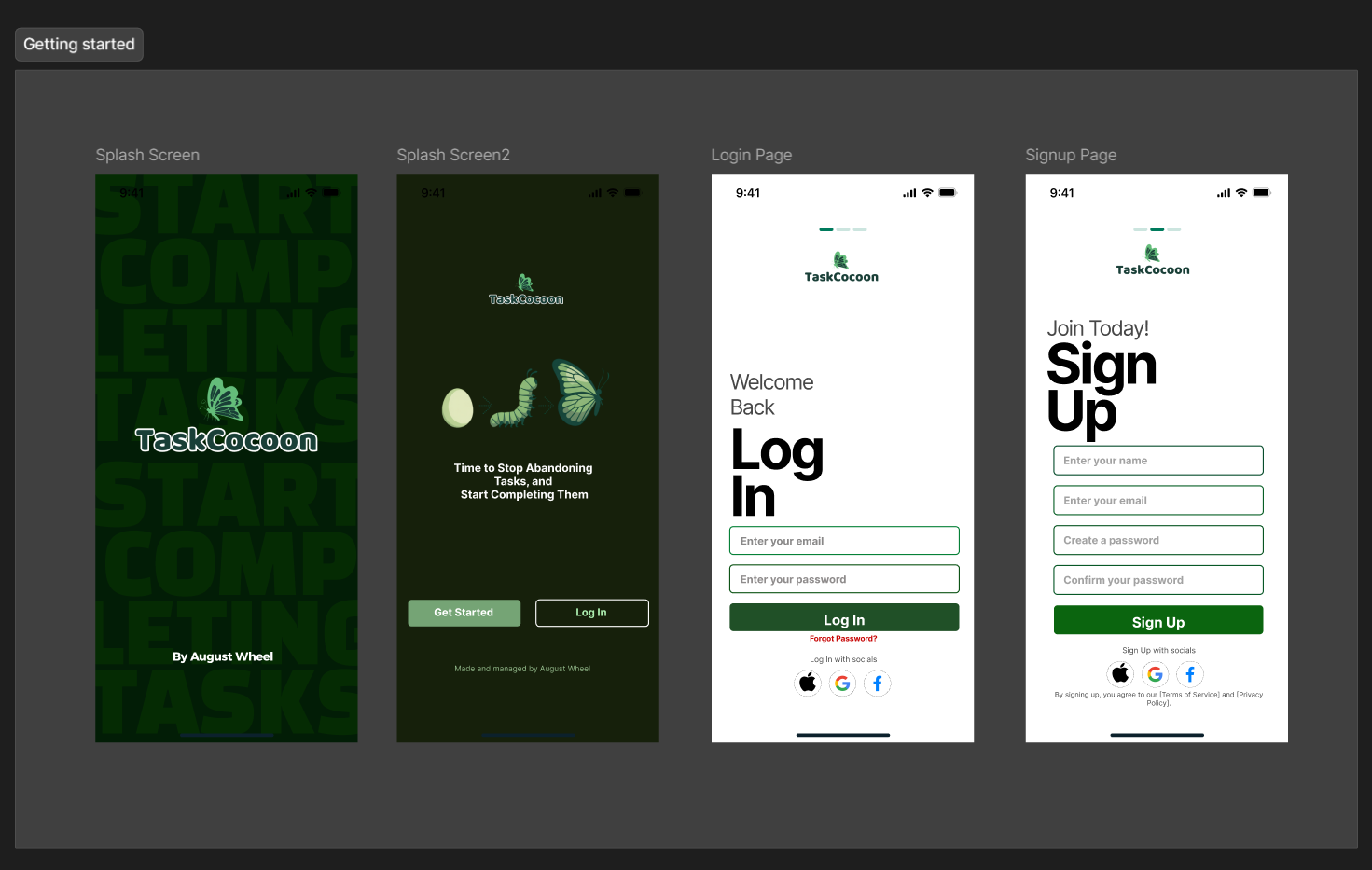
I knew it was only a matter of time before I waded into building a mobile application. In my mind’s eye, the process looked easy and simple: take TaskCocoon, my web-based task management app that’s already live, slap it into Expo, tweak a few things, submit to the App Store, and boom. Downloadable by Friday.
I wish that’s what happened.
But no. No no no no. Far from it.
My first attempt at building a mobile app from an existing web app has been a proper butt-kicking experience. A humbling one. The kind that makes you question every decision you’ve made so far. But here’s what I’ve learned: if there’s a real skill to develop when it comes to AI and automation, it’s patience. Brace yourself for the initial confusion stage. Trust me when I say it gets clearer as you stick with it.
Here’s my experience so far building an iOS native app of TaskCocoon using AI.

The Web Version Lied to Me
When I built TaskCocoon for web using Claude Code, everything felt frictionless. I’d describe what I wanted, Claude would generate the code, I’d see it live in the browser within minutes, iterate, push to GitHub, and watch it auto-deploy on Vercel. The feedback loop was so tight that it felt like I was actually coding.
I wasn’t. I was vibe-coding.
And that’s fine for web. Web forgives a lot. Responsive design can hide sins. You don’t have to think about safe areas, notches, status bars, or the dozens of unspoken mobile conventions that users expect as second nature. The web version of TaskCocoon worked, it was polished. It was functional. That was enough.
iOS doesn’t let you get away with that.
When AI Hits Its Ceiling
Here’s the uncomfortable truth I discovered: Claude Code is brilliant at writing code. It’s terrible at deciding if that code feels good.
I’d ask Claude to build me a splash screen and animate the app’s logo with Lottie animations. It delivered. Beautiful, functional component. But when I saw it in the iOS Simulator, I couldn’t tell if the timing felt right. If the animation matched the vibe of the app. If it actually communicated anything meaningful or if it was just spinning shapes.
Then the login carousel. I wanted three screens that teach people what TaskCocoon does using the butterfly metamorphosis metaphor. Claude built the carousel perfectly. Smooth transitions, clean code, technically flawless. But did it actually teach the concept? Did people understand that tasks transform into completed items the way caterpillars become butterflies? I have no idea. Claude doesn’t either.
The pattern became clear: Code is solvable. Design requires taste, judgment, and iteration. And taste can’t be generated.
The Real Bottleneck Isn’t Code Anymore
When people ask me about building products with AI, they always worry about one thing: “But can the AI actually code?”
Yes. That’s not the problem anymore. The problem is everything else.
I had to learn UI/UX thinking. Mobile-first patterns. Onboarding psychology. The difference between making an empty state feel like an invitation versus a failure. Whether celebrations should feel joyful or subtle. How to balance a playful butterfly metaphor with professional typography and spacing.
I had to learn animation using Lottie Files. I had to figure out image generation with Nano Banana (I actually switched from Ideogram mid-project because the consistency wasn’t there). I had to make aesthetic decisions about color palettes, hierarchy, and the exact line between fun and professional.
These aren’t problems Claude can solve with better prompts. They require hands-on learning, failure, and taste.
My New Skill Stack
Building TaskCocoon’s iOS version forced me to become a designer in ways I never expected. Not a professional designer. But someone who has to make intentional decisions about how an app feels.

I’m learning Figma now, trying to understand design systems and component thinking. I’m experimenting with Penpot, an open-source alternative that might let me integrate Claude Code more directly into my design workflow through MCP servers. I’m spending hours in the iOS Simulator tweaking spacing by two pixels because something feels off.
This is uncomfortable. But it’s also the most creative part of this project so far. When I was just vibe-coding the web version, I was following Claude’s lead. Now I’m making actual decisions. I’m not just shipping code. I’m shipping something I’ve thought about.
The Vulnerability
Here’s the thing that took me a while to admit: I’m not a professional designer. I’m an IT guy who used AI to skip the traditional coding barrier. And it worked. I shipped a product. But moving to iOS exposed a new barrier: design taste.
There’s no prompt that generates that. There’s no “build me something that feels intentional.” It either feels intentional or it doesn’t, and you have to develop the eye to tell the difference.
Learning this by doing it, in public, sometimes creating things that fall flat. That’s the real experiment right now. Not whether AI can build apps. It obviously can. The question is whether someone like me, without traditional design training, can develop the taste to ship something beautiful.
I’m betting I can.
What This Teaches Me
Building TaskCocoon with AI removed the coding gatekeep. Moving to iOS exposed a new gatekeep: design. But unlike code, which I outsourced, I’m learning design by doing it. And that’s uncomfortable. It’s also why this matters.
Here’s what I think happens next: if non-traditional developers can use AI to ship functional products, more people will discover they’re better designers than they thought. Design isn’t some mystical skill locked behind years of training. It’s taste plus iteration plus paying attention.
That’s learnable. I’m learning it right now.
The iOS version of TaskCocoon isn’t finished. The design work is just beginning. But I’m documenting every decision, every failed iteration, every moment I stare at the simulator and think “this doesn’t feel right yet.” That’s the real story worth sharing.
Not whether AI can code. Obviously it can. The story is what happens when you remove the code problem and discover that of the hard part was always design.



Leave a Reply